MATIAS FISCHER

Technical Sound Designer
Open to Work · Remote

Bachelor's Degree in Video Game Development specializing in adaptive audio architecture, middleware integration (FMOD/Wwise), and performance optimization for interactive media.

LinkedIn Download CV Tech Docs (PDF) Itch.io Email
About Me

I'm a technical sound designer based in Buenos Aires. I focus on building adaptive audio systems in FMOD and Wwise, designing sound effects, and writing the C# code required to connect them smoothly to gameplay.

I like making audio that responds naturally to the player without eating up system performance. I'm currently looking for junior technical audio roles and open for collaborations.

Technical Stack

Middleware

Wwise & FMOD Studio

Programming

C# & C++

Game Engines

Unity & Unreal 5

Audio Production

Pro Tools & Cubase

Featured Work

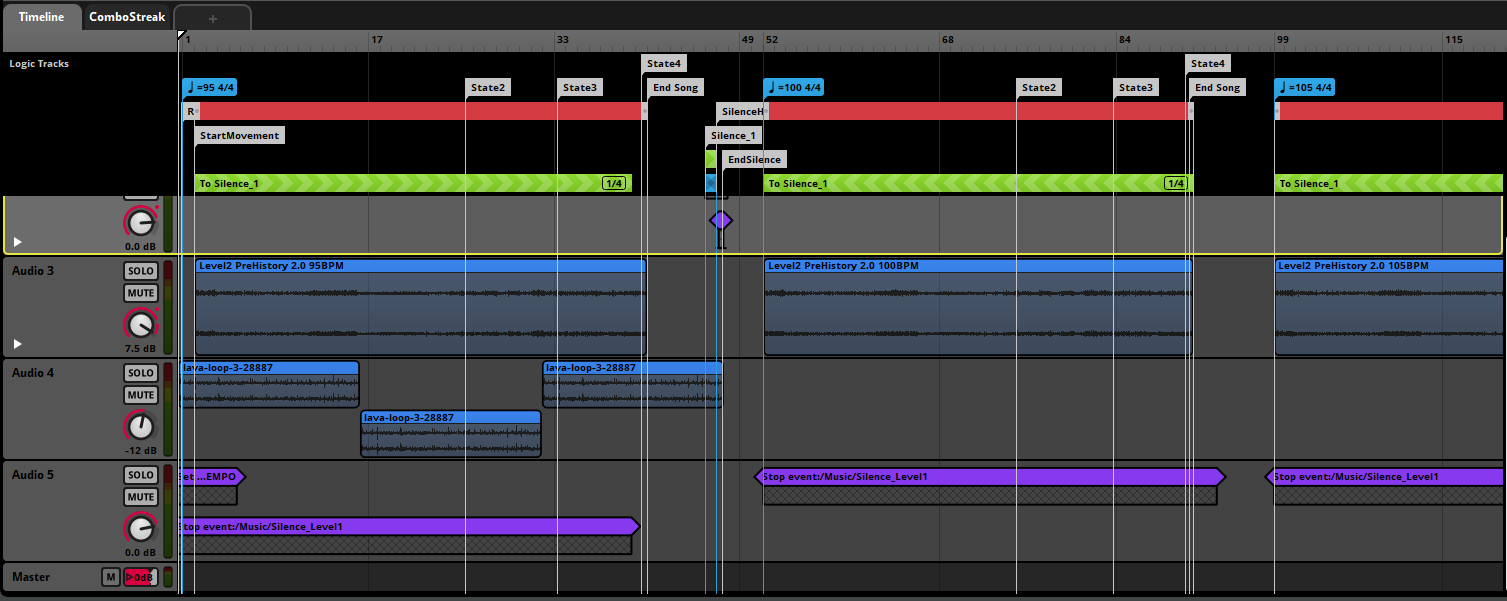
Interactive Audio (Wwise)

Wwise + Unity · Music stems are not my own; shown for the implementation

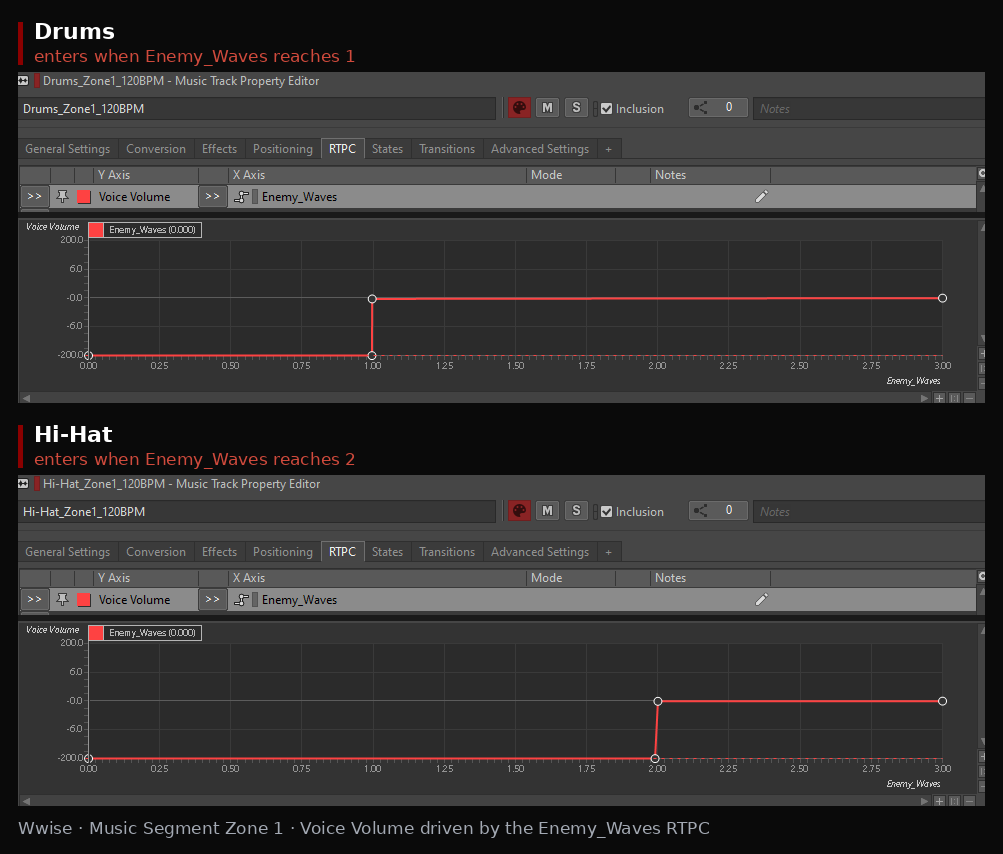
Wwise RTPC curves: Drums enter at Enemy_Waves 1 and Hi-Hat at 2
  • Dynamic Layering: Music stems enter as the enemy count rises: Unity sends the count (0 to 3) to the Enemy_Waves RTPC, which drives each stem's Voice Volume.
  • Weather Systems: Complex RTPC curves controlling low-pass filters and ambient density.
  • Spatial Logic: Implementation of Reverb Zones and state-driven acoustic transitions.
  • Unity Integration: A single weather value drives both the Wwise RTPC and the rain particles, and a day-cycle controller maps normalized time to a time-of-day RTPC.

Clockwork Siege

Mobile Tower Defense

Unity (C#) · Custom Audio System Architecture

  • Custom Audio Manager: C# singleton that plays sounds by name from an Inspector-configured library (clip, volume, pitch, loop), with a dictionary lookup and a dedicated looping music source.
  • AudioSource Pooling: A configurable pool of AudioSources (10 by default) is created at startup, so no sources are added during gameplay.
  • Voice Cap & Stealing: The pool size caps simultaneous SFX; when every voice is busy, the oldest assigned voice is stopped and reused.
View Code Breakdown ↓
FMOD Prototypes

ForestAmbience - Dynamic Weather & Day/Night

Adaptive Middleware Architecture

FMOD Studio prototype · Not engine-integrated · Sound design + system design

  • Weather Control: Rain_Intensity blends two rain layers (Rain_Medium / Rain_Full), with thunder as multi-instruments.
  • Day/Night Cycle: Daytime drives separate day (Day Animals) and night layers (Crickets, Owls, Wolves, Frogs, Chimes).
  • Reactive Fauna: Frog and wolf spawn rates follow Daytime; frogs also follow Rain_Intensity, so they are present every night and by day only when it rains.
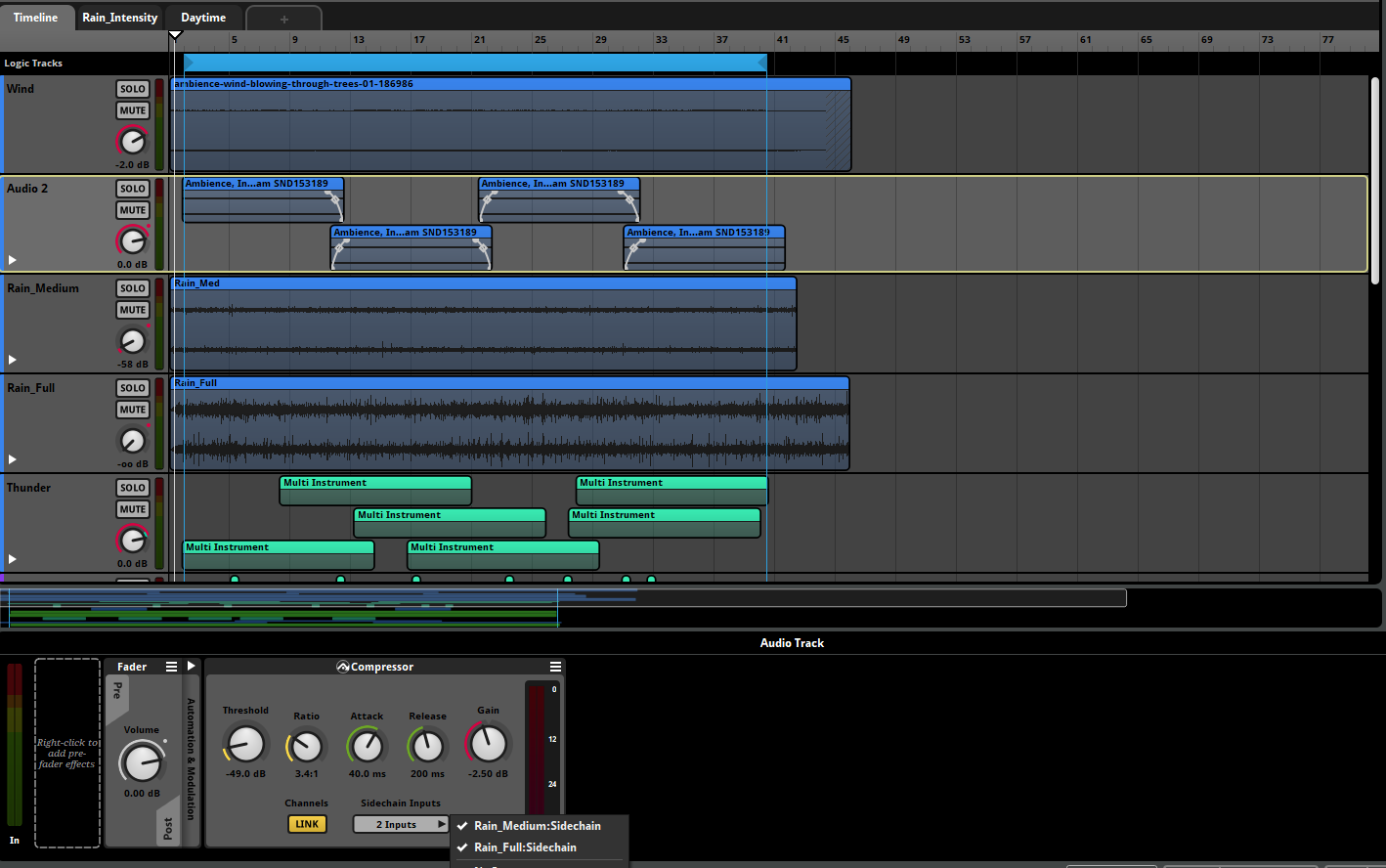
  • Reactive Ducking: Compressor on the ambience bed, sidechained to both rain tracks, so rain takes space in the mix.
  • Variability: Scatterer and multi-instruments plus overlapping crossfaded loops to avoid audible repetition.
Compressor on the ambience bed with sidechain inputs from both rain tracks

Sidechain compressor on the ambience bed

Technical Breakdowns

Dancing Forward · FMOD Studio + Unity

Tempo changes without pitch shift

Problem
The music had to speed up with the player's combo streak, but pitch-shifting a single track would break the beat callbacks tied to the FMOD tempo-marker grid.
Approach
Each song is arranged at several escalating tempos on one timeline event. Magnet Regions with Relative Offsets, driven by ComboStreak conditions, jump to the matching position in the faster version, so there are no audible cuts. Since each tempo has a different real duration, every section's end timestamp is stored as an FMOD User Property and parsed in C# (LoadMarkers / ParseTimeToMs) to keep the level timer correct. A lookup then returns the time remaining until the next marker of a given name, from the current timeline position.
Result
The tempo follows the player's performance while beat-synced logic keeps working. The setup is designed to be reusable as an FMOD template across levels.
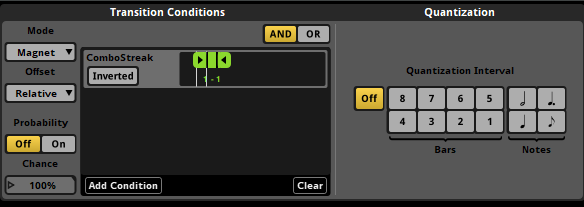
FMOD Magnet Region transition conditions with a ComboStreak parameter and relative offset

Magnet Region: ComboStreak condition with relative offset

View code
Load end times from User Properties
// Read each tempo section's end time from FMOD User Properties ("mm:ss" strings) void LoadMarkers() { FMOD.Studio.EventDescription desc; musicInstance.getDescription(out desc); int count; desc.getUserPropertyCount(out count); List<FMOD.Studio.USER_PROPERTY> properties = new List<FMOD.Studio.USER_PROPERTY>(); for (int i = 0; i < count; i++) { FMOD.Studio.USER_PROPERTY prop; desc.getUserPropertyByIndex(i, out prop); if (prop.type == FMOD.Studio.USER_PROPERTY_TYPE.STRING) properties.Add(prop); } // Alphabetical order of the property names keeps the timeline order properties.Sort((a, b) => string.Compare(a.name, b.name, StringComparison.OrdinalIgnoreCase)); foreach (var prop in properties) timelineInfo.allMarkers.Add(new MarkerInfo(prop.name, ParseTimeToMs(prop.stringValue()))); } // "1:23" -> 83000 ms private int ParseTimeToMs(string timeString) { string[] parts = timeString.Split(':'); if (parts.Length != 2) return 0; int minutes = int.Parse(parts[0].Trim()); int seconds = int.Parse(parts[1].Trim()); return (minutes * 60 + seconds) * 1000; }
Time remaining to the next marker
// Index of the closest marker with this name that is still ahead of the playhead public int GetNextMarkerIndexByName(string markerName) { musicInstance.getTimelinePosition(out int currentPos); int closestIndex = -1; int smallestDiff = int.MaxValue; for (int i = 0; i < timelineInfo.allMarkers.Count; i++) { var marker = timelineInfo.allMarkers[i]; if (marker.name == markerName) { int diff = marker.position - currentPos; if (diff > 0 && diff < smallestDiff) { smallestDiff = diff; closestIndex = i; } } } return closestIndex; } // Milliseconds left until that marker, from the current timeline position public int GetTimeRemainingToMarker(int markerIndex) { musicInstance.getTimelinePosition(out int currentPos); if (markerIndex < 0 || markerIndex >= timelineInfo.allMarkers.Count) return -1; return timelineInfo.allMarkers[markerIndex].position - currentPos; }

Dancing Forward · FMOD Studio + Unity

Gameplay locked to the beat

Problem
Gameplay, UI animations and the countdown had to stay in sync with the music at any BPM, and frame-based timing in Update() is not tied to the audio.
Approach
FMOD TIMELINE_BEAT and TIMELINE_MARKER callbacks fill a TimelineInfo object (beat in bar, beat counter, beat duration, last marker). Scripts that need to be in sync subscribe to Unity Events raised from those callbacks, and the Countdown parameter is updated on every beat.
Result
The count-off, VFX and rhythm logic follow the music regardless of each level's BPM.
View code
Beat Sync: FMOD Timeline Callbacks
// FMOD beat/marker callbacks drive gameplay sync, instead of Update() private static FMOD.RESULT BeatEventCallback(FMOD.Studio.EVENT_CALLBACK_TYPE type, IntPtr instancePtr, IntPtr parameterPtr) { var instance = new FMOD.Studio.EventInstance(instancePtr); instance.getUserData(out IntPtr userDataPtr); if (userDataPtr == IntPtr.Zero) return FMOD.RESULT.OK; var info = GCHandle.FromIntPtr(userDataPtr).Target as TimelineInfo; if (info == null) return FMOD.RESULT.OK; switch (type) { case FMOD.Studio.EVENT_CALLBACK_TYPE.TIMELINE_BEAT: var b = (FMOD.Studio.TIMELINE_BEAT_PROPERTIES)Marshal.PtrToStructure( parameterPtr, typeof(FMOD.Studio.TIMELINE_BEAT_PROPERTIES)); info.BeatInBar = b.beat; info.BeatCounter++; info.BeatDurationMs = b.tempo > 0 ? 60000f / b.tempo : 0f; break; case FMOD.Studio.EVENT_CALLBACK_TYPE.TIMELINE_MARKER: var m = (FMOD.Studio.TIMELINE_MARKER_PROPERTIES)Marshal.PtrToStructure( parameterPtr, typeof(FMOD.Studio.TIMELINE_MARKER_PROPERTIES)); info.LastMarker = m.name; break; } return FMOD.RESULT.OK; }

Clockwork Siege · Unity

Bounded voices with a pooled AudioManager

Problem
Waves of enemies in a mobile tower defense can fire many sounds at once, and the number of simultaneous voices needs a limit.
Approach
A custom AudioManager creates a fixed pool of AudioSources at startup and plays sounds by name through a dictionary. A queue tracks the pool: a free source is reused, and when every voice is busy, the oldest assigned one is stopped and reused.
Limitation
Moving a source to the back of the queue rebuilds it on every call, which allocates. A linked list would avoid that. Not yet measured with the Profiler.
View code
Pool creation
// Create the sources once at Awake, so none are added during gameplay private void CreateAudioSourcePool() { sourcePool = new Queue<AudioSource>(); for (int i = 0; i < poolSize; i++) { AudioSource src = gameObject.AddComponent<AudioSource>(); src.playOnAwake = false; sourcePool.Enqueue(src); } }
Voice stealing
// Reuse a free voice; if the pool is exhausted, steal the oldest one private AudioSource GetSourceFromPool() { foreach (var source in sourcePool) { if (!source.isPlaying) return ExtractAndRequeue(source); // move it to the back of the queue } // All voices busy: the front of the queue is the oldest assigned voice AudioSource busySource = sourcePool.Dequeue(); busySource.Stop(); // stop the previous sound cleanly sourcePool.Enqueue(busySource); return busySource; }